Buckets are the top level containers in Amazon S3 for data storage. In order to start working with Amazon S3 you need to create at least one bucket.
Once you have a buket, you may organize files by creating different folders inside the bucket to reflect the logical structure of your files.
The LIST requests on Amazon S3 are limited to 1000 objects per page and all pages must be requested sequentially (there is no way to parallel this process), so the bucket with thousands of files in the root may take significant amount of time just to display the content.
We recommend to avoid placing all the files in the bucket root or just in a single folder and create a hierarchical folder structure to organize your files in a bucket.
To create new folder:
1. Start S3 Browser and select the bucket you want to work with
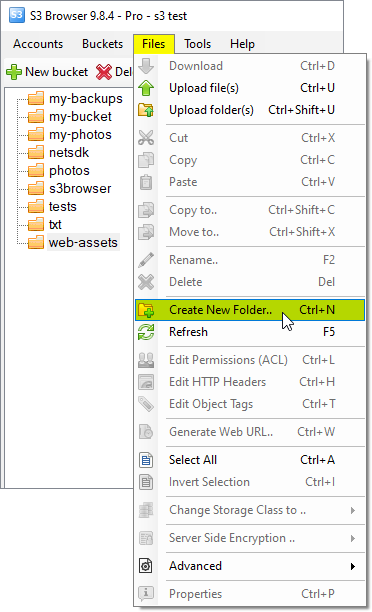
2. Click Files -> Create New Folder
Click Files, Create New Folder
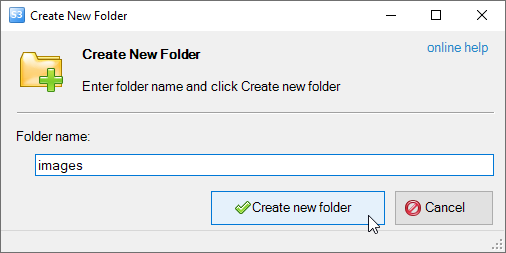
The Create New Folder dialog will open:
Type the name for your new folder, and click OK
3. Type the folder name, and click Create new folder
You may also create netsted folders to create hierarchical folder structure.
"Amazon Web Services", "AWS", "Amazon S3", "Amazon Simple Storage Service", "Amazon CloudFront", "CloudFront", the "Powered by Amazon Web Services" logo are trademarks of Amazon.com, Inc. or its affiliates in the US and/or other countries.