For some large buckets or folders, which may contain hundreds of thousands of files, you may want to use Pagination to break large bucket listings into pages.

Pagination Options allow you to control how bucket listing will be displayed.

To Enable Bucket Pagination

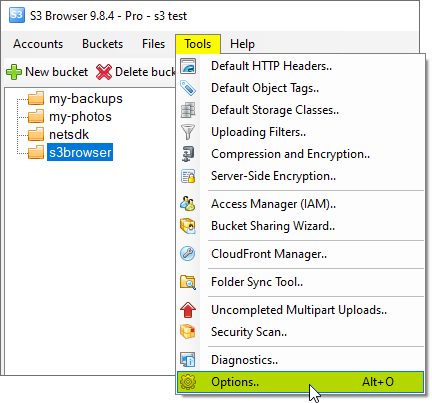
  1. Click Tools -> Options and choose General tab.
    Bucket Pagination Options
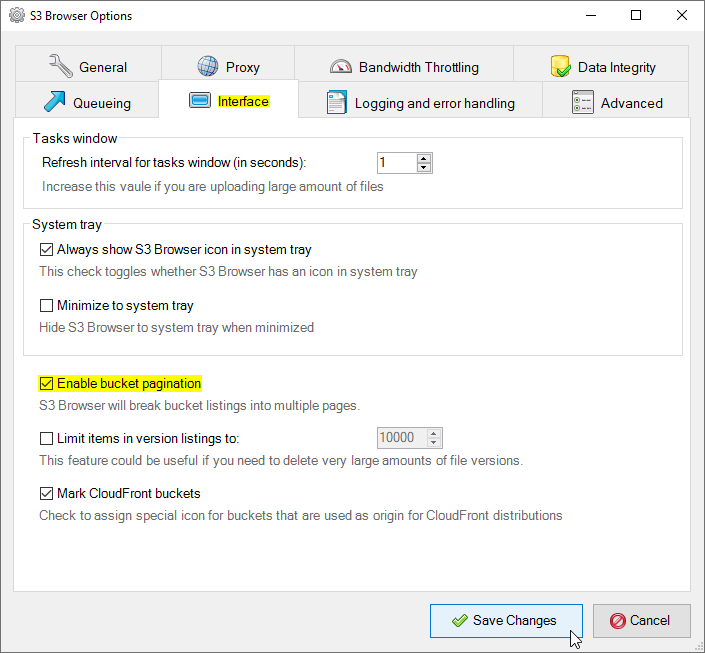
    Click Tools -> Options - > General to edit pagination settings
  2. Turn on Enable bucket pagination check-box. You can also configure how many keys (objects) per page will be displayed. Max value for Keys per page is 1000. This is how many keys per request Amazon S3 can return.

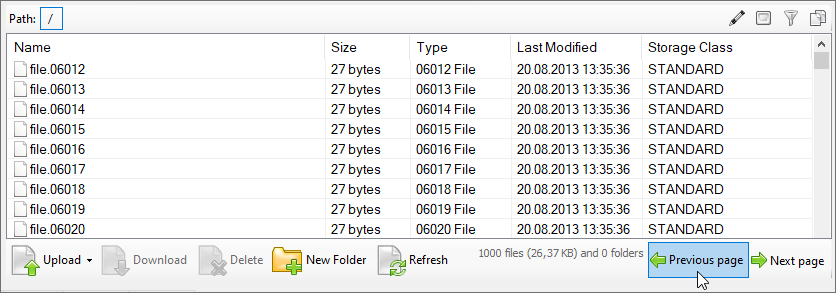
Once enabled, Bucket Listings will be displayed as shown below:

How Bucket Pagination works
How bucket pagination works. Use the Next Page, Previous Page buttons to navigate through the pages.

You can use the Next Page / Previous Page buttons to navigate through the pages.

To Disable Bucket Pagination

Click Tools -> Options -> General and turn off Enable bucket pagination check-box. Then go to S3 Browser and click Files -> Refresh.
download s3 browser, bucket explorer
S3 Browser 3.3.9 Free

Powered by Amazon Web Services and Rated by CNET Editors!


Related Products

"Amazon Web Services", "AWS", "Amazon S3", "Amazon Simple Storage Service", "Amazon CloudFront", "CloudFront", the "Powered by Amazon Web Services" logo are trademarks of Amazon.com, Inc. or its affiliates in the United States and/or other countries.