What's new in S3 Browser version 3.3.9. Release notes.

Some time ago we developed command line uploader to automate the uploading of files and folders to Amazon S3. Today we are releasing it to public. You can find it the same folder where S3 Browser was installed. (Usually C:\Program Files\S3 Browser\)

It uses the same settings as a GUI version, so you can use the GUI to configure it.

The usage is pretty simple: s3browser-put.exe   your-account-name   local-path   remote-path

For example: s3browser-put.exe   my-account   c:\backups\*.bkf   my-bucket/backups

Account name - the name you specified when adding your access keys to S3 Browser.
You can find more detailed instructions on how to add new access keys here.

If spaces appear in the path, enclose it in quotation marks. Do not use traling backslashes.

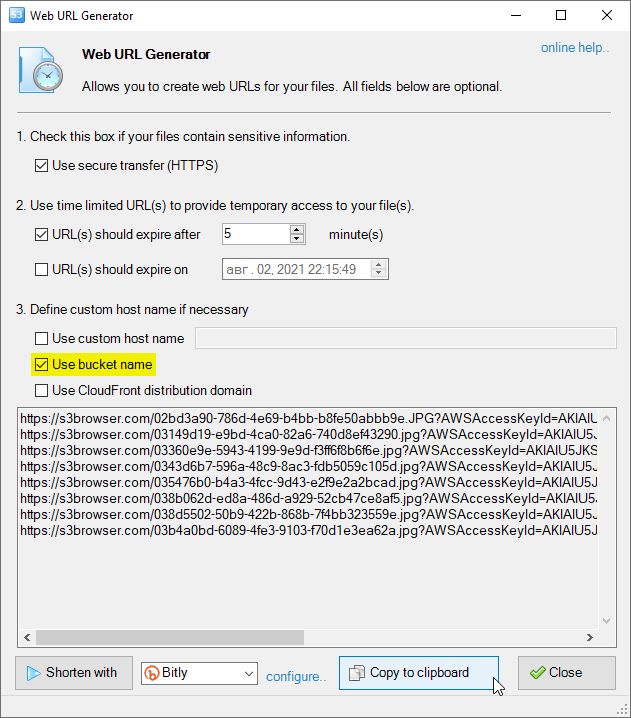
Improved Web Urls Generator allows you to use current bucket name as a hostname.

use current amazon s3 bucket name as a hostname

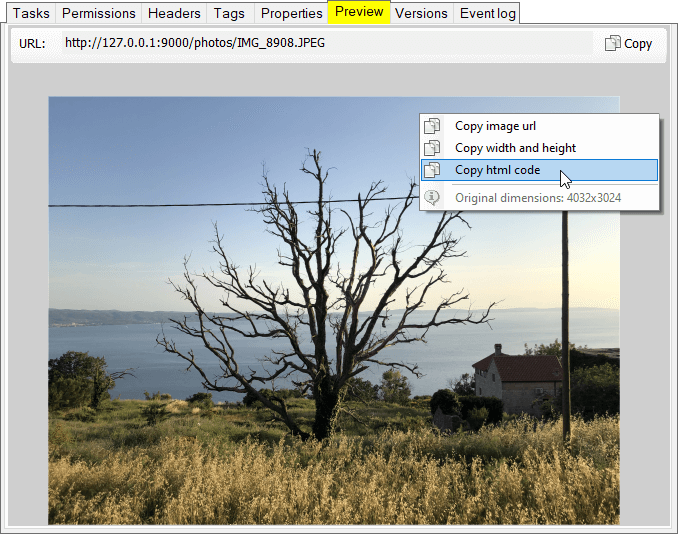
This new feature allows you to generate html code for images stored on Amazon S3.

generate html code for images stored on Amazon S3
download s3 browser, bucket explorer
S3 Browser 3.3.9 Free

Powered by Amazon Web Services and Rated by CNET Editors!


Related Products

"Amazon Web Services", "AWS", "Amazon S3", "Amazon Simple Storage Service", "Amazon CloudFront", "CloudFront", the "Powered by Amazon Web Services" logo are trademarks of Amazon.com, Inc. or its affiliates in the United States and/or other countries.