Working with Amazon S3 Buckets To Delete an Amazon S3 Bucket
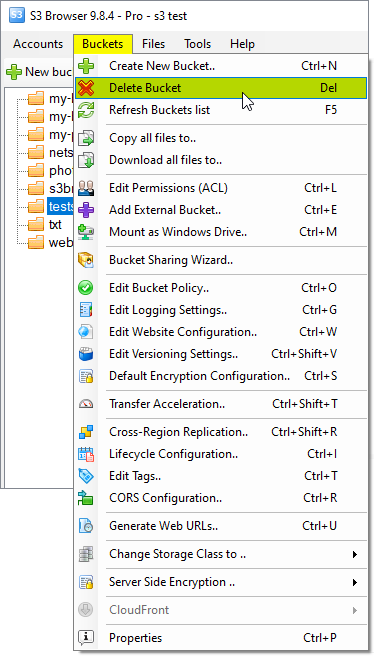
1. Select the bucket you want to delete and click Buckets -> Delete Bucket
You can also use the Del keyboard shortcut to delete an Amazon S3 Bucket.
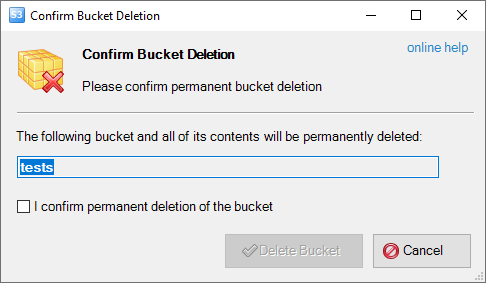
The Confirm Bucket Deletion dialog will open:
Confirm Bucket Deletion Dialog
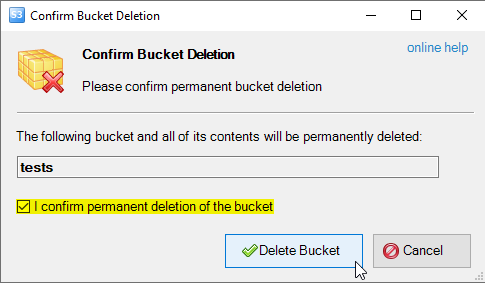
2. Confirm that you would like to delete the bucket by checking I confirm permanent deletion of the bucket and click Delete Bucket .
Confirm Bucket Deletion
Selected Bucket and all of its contents will be deleted recursively.
After the bucket and all files within the bucket are deleted, the list of available buckets will be refreshed.
To Delete an External Bucket
External Buckets - are the buckets shared with you by another user.
To disconnect from external bucket and remove it from the list follow the steps below:
1. Select an external bucket and click Buckets, Delete Bucket
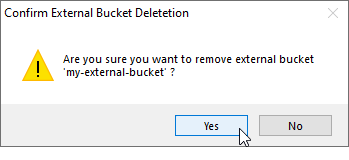
2. Confirm External Bucket deletion:
Confirm the deletion of External Bucket
Selected bucket will be removed from the list. All files inside the bucket will remain intact. Bucket can only be deleted by the bucket owner.
Download S3 Browser S3 Browser 13.3.5 Freeware
"S3 Browser is an invaluable tool to me as a web developer to easily manage my automated site backups" -Bob Kraft, Web Developer
"Just want to show my appreciation for a wonderful product. I use S3 Browser a lot, it is a great tool." -Gideon Kuijten, Pro User
"Thank You Thank You Thank You for this tool. A must have for anyone using S3!" -Brian Cummiskey, USA